 Shopxare Team
Short answer: A customer service SLA for an online store is a written promise of how fast you reply, on which channels and during which hours. A good starting point for a small team: a first reply within 3 minutes in live chat and within 4 working hours by email, marketplace messages answered well inside each marketplace's own deadline, and at least 90% of conversations within target. Count the clock in business hours, pause it when you are closed, and publish only a promise you can keep in a bad week.
Below: the four parts every SLA needs, targets by channel with sources, the marketplace deadlines that already apply to you, how the business-hours clock works, the compliance formula, a one-page template to copy, and when an SLA is overkill.
What an SLA means for a small store
In large companies an SLA (service level agreement) is a contract with penalties. In an online store it is usually two things:
- An internal target your team works to, for example "chat answered within 3 minutes".
- A public promise customers see, for example "we reply to emails within one working day".
Keep the internal target tighter than the public promise. The gap is your buffer for a sick day, a carrier strike or Black Friday week. A store that promises 4 hours publicly and works to 4 hours internally breaks its promise the first time someone is off.
The four parts every SLA needs
- Scope. Which channels count (chat, email, contact form, marketplace messages, Telegram) and which requests are out (wholesale offers, press).
- Coverage hours. When the clock runs: days, hours, time zone and public holidays.
- Targets. A first reply time per channel and per priority.
- Compliance level. The share of conversations that must meet the target, for example 90% per week.
Most SLAs that fall apart skip part 2. Without coverage hours every Saturday message is a breach, and after a month nobody trusts the number.
Reply targets by channel
These are the targets we'd start with for a store where one to ten people answer customers. All times are working time unless marked otherwise.
| Channel | First reply target | Share within target | Why this number |
|---|---|---|---|
| Live chat | 3 minutes | 90% | The customer is on the page now and leaves if nobody answers |
| Email and contact form | 4 working hours | 90% | Realistic for a team of 1–3; same working day is the upper limit |
| Urgent cases (wrong address before dispatch, double charge, can't pay) | 30 minutes, any channel | 95% | Waiting costs money: a wrong shipment or a lost order |
| Marketplace messages | Half of the marketplace's deadline | 100% | Missed deadlines cost ranking or the account |
| Messages outside office hours | Automatic reply at once, a person in the first hour after opening | – | The customer knows when to expect you |
Two reference points behind the chat and email numbers. LiveChat's report, based on more than 35,000 companies, puts the average first response time in live chat at 35 seconds across industries and 55 seconds in retail (LiveChat Customer Service Report, data updated 2024). For email, a survey of more than 3,200 people by Toister Performance Solutions found that a reply within one hour meets the expectations of 88% of consumers, and nearly a third expect exactly that (Toister, March 2020).
So a 3-minute chat target is generous by industry standards, and that is on purpose: in a small store the person on chat also packs parcels. If you already answer 90% of chats in under a minute, tighten the target. Our guide to first response time explains how to measure the median and the slowest 10%.
Marketplace deadlines are SLAs you already have
If you sell on marketplaces, part of your SLA is written for you. These are the rules as published on each marketplace's own pages, checked in October 2026:
| Marketplace | Deadline | Weekends | Internal target we'd set |
|---|---|---|---|
| Amazon (buyer messages) | 24 hours | Included, holidays too | 12 hours, every day |
| Kaufland (customer tickets) | 48 hours, for 100% of tickets | Excluded, public holidays too | 24 working hours |
| Allegro (Dyskusja) | 24 hours | Excluded, public holidays too | 12 working hours |
| Trendyol (product questions) | 3 business days, then the question closes | Business days only | 1 business day |
| Mercado Libre (pre-sale questions) | No hard rule; it shows sellers the extra sales they could get by answering within 1 hour | – | 1 hour in office hours |
Sources: Amazon help text quoted on the Seller Forums, Kaufland Seller University, Allegro help, Trendyol developer docs, Mercado Libre developer docs.
Amazon is the one that breaks office-hours SLAs: its clock runs on Saturday and Sunday. If you sell there, put a weekend check into your coverage hours, even if it is one person looking at messages at 10:00 on both days. More rules and reply templates are in our post on marketplace reply deadlines.
How the business-hours clock works
An SLA measured in business hours only counts the minutes when you are open. Take a 4-working-hour email target and office hours Monday to Friday, 09:00–17:00. An email arrives on Friday at 16:30.
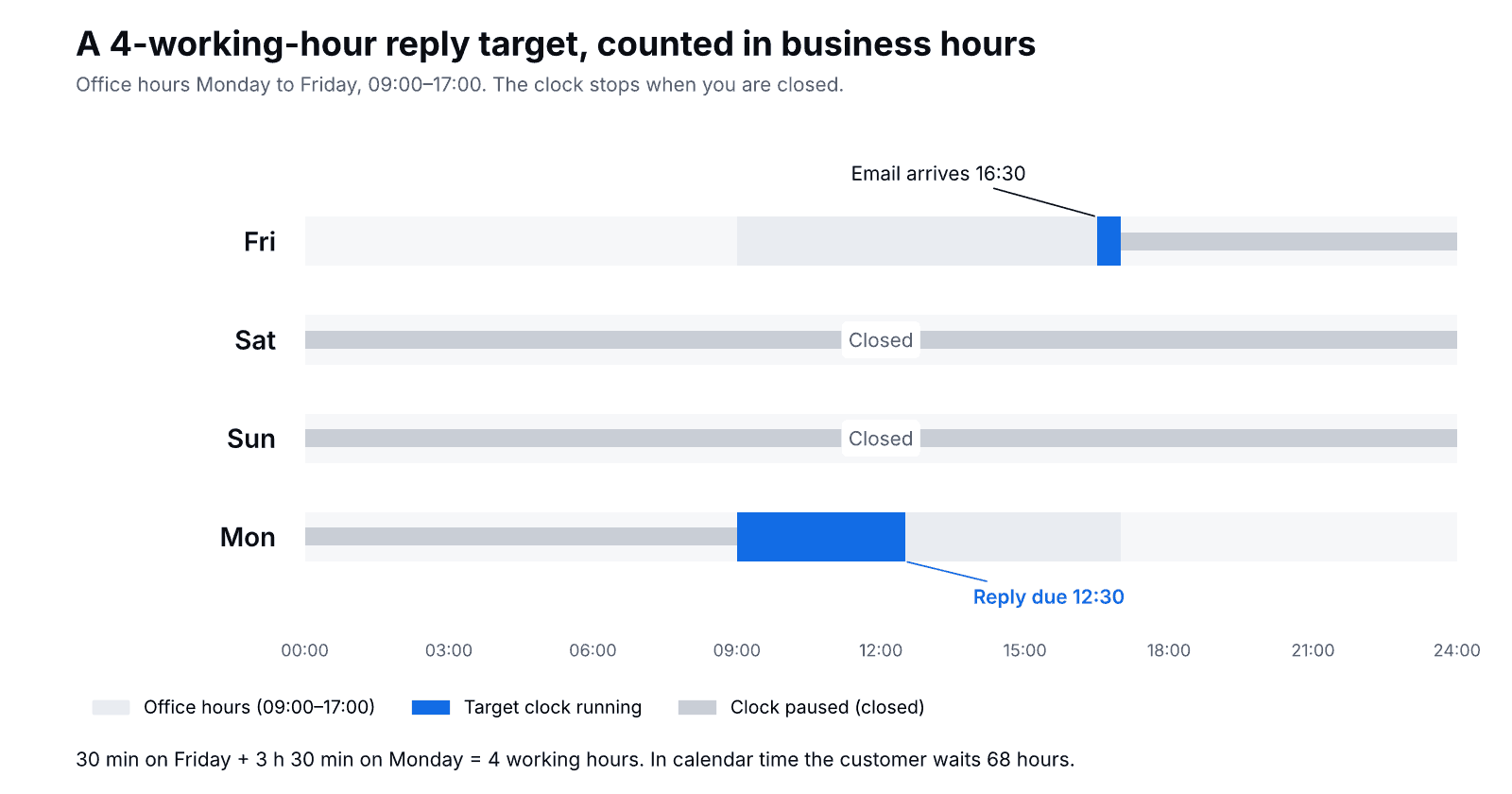
Thirty minutes count on Friday. The clock stops at 17:00, stays stopped all weekend and starts again on Monday at 09:00. The remaining 3 hours 30 minutes run out at 12:30, so that is when the reply is due. The customer has waited 68 hours in calendar time, and your report still shows the conversation as on time.
That has two consequences:
- Your SLA report can look perfect while customers wait all weekend. Tell them so up front with an after-hours message that names the time you are back. Our after-hours message templates have twelve versions to copy.
- Holidays must be in the calendar. If 25 and 26 December are not marked as closed, every email from Christmas Eve becomes a breach, and your December numbers are useless.
Also decide in writing whether the clock stops while you wait for the customer, for example after asking for a photo of a damaged item. The simplest rule for a small team: the target applies to the first reply to every new customer message, and nothing runs while the next move is the customer's.
How to calculate SLA compliance
SLA compliance (%) = conversations answered within target ÷ conversations that had a target × 100
A made-up but typical month: 412 conversations had a target and 371 got a reply in time. 371 ÷ 412 × 100 = 90.0%, which meets a 90% target.
Leave out spam and conversations that never needed a reply from your team. Do not leave out the awkward ones. Then look at the 41 misses rather than the 90%: if 29 of them fall between 12:00 and 14:00, you don't have a speed problem, you have a lunch-cover problem.
Why not aim for 100%? Because a 100% target teaches people to send "we're looking into it" just to stop the clock. That reply helps nobody. 90% is a target people can hold honestly. The exception is marketplaces, where 100% is the rule and the safety margin comes from the tighter internal target.
Priority levels: two or three are enough
- Urgent: an order about to ship to the wrong address, a double charge, a customer who can't pay at checkout. 30 minutes on any channel.
- Normal: order status, returns, product questions. The channel targets above.
- Low (optional): partnership offers, general feedback. 2 working days.
Set priority by what waiting costs, not by how angry the message sounds. A polite "I typed the wrong house number" is more urgent than a furious review of a product that arrived last month.
SLA template to copy
Replace the brackets and keep it to one page. If it doesn't fit on one page, nobody on the team will read it.
Customer service SLA – [store name]
Valid from: [date]    Owner: [name]    Reviewed: every 3 months

1. Scope
Channels: website chat, email ([[email protected]]), contact form, [marketplaces]
Not covered: wholesale requests, press (forward to [name])

2. Coverage hours
Monday–Friday 09:00–17:00 [time zone]. Closed on public holidays in [country].
Outside these hours: automatic reply with the time we are back.
Amazon messages: checked at 10:00 on Saturday and Sunday.

3. First reply targets (working time unless stated)
Urgent (wrong address, double charge, can't pay): 30 minutes, any channel
Website chat: 3 minutes
Email and contact form: 4 working hours
Amazon: 12 hours, calendar time
[Other marketplace]: half of its own deadline

4. Compliance
At least 90% of conversations within target each week. Marketplaces: 100%.

5. When a target is at risk
Chat waiting [2] minutes: notify the whole team.
Missed targets reviewed every Monday, by channel and by hour.

6. Public promise (help center, contact page, after-hours message)
"We answer chats within a few minutes during office hours
and emails within one working day."
Example: a three-person home decor store
An illustrative case: a store selling candles and ceramics on its own Shopify site and on Amazon.co.uk. Three people, open Monday to Friday 09:00–17:30. They adopt the template above.
The first month: chat compliance 94%, email 81%. Almost every email miss is on Monday morning, when the weekend's messages land at once. Two changes follow: one person starts at 08:00 on Mondays and handles only email until 10:00, and Amazon messages get a check at 10:00 on Saturday and Sunday. The next month email compliance is 92%. The public promise on the contact page never changed: "within one working day".
Setting it up in Shopxare
Shopxare has office hours and reply targets built in, so the SLA above runs without a spreadsheet:
- Office hours. In Teams and assignment, turn on "Use office hours", set the hours for each day and add your Holidays. Outside office hours the Messenger tells customers when you'll be back, and reply targets stop running.
- Targets. Under "Response-time targets (SLA)", fill in "Reply within (normal)" and "Reply within (priority)". Targets are measured in working minutes. While a customer waits, the inbox shows a "Reply in …" countdown, and conversations that miss the target are marked "Overdue".
- Priority by channel or content. A workflow with the trigger "A new conversation reaches the team", the condition "Channel" and the action "Set priority" puts chats on the faster target. A second one with the condition "Customer message" contains "wrong address" does the same for urgent cases.
- Escalation before the miss. A workflow with the trigger "The customer has waited for…" can assign the conversation to a team or add an internal note. Turn on the "Missed response targets" notification as well.
- The weekly review. Reports shows the median first response time, time to close and missed targets, filtered by channel, team or teammate.
- Nights and weekends. Are AI answers in the Messenger from your own help articles and pages around the clock and hands over to your team when it should.
Where Shopxare is not the right fit: it has two target levels, normal and priority, and its targets cover replies. If you need separate SLA policies per customer tier or contract, or resolution-time targets with their own clock, a help desk built around SLA policies, such as Zendesk or Freshdesk, suits you better.
When an SLA is overkill
- A solo seller with fewer than about ten messages a day. Publish your office hours and "we reply within one working day", and skip the compliance math.
- When you can't measure it. A target you can't report on is a wish. Set up the measurement first, then publish.
- A promise made to beat competitors. "Email replies within 30 minutes" looks good on the contact page and breaks on the first busy Monday.
FAQ
What is an SLA in customer service?
A written promise of how quickly you reply, on which channels and during which hours, plus the share of conversations that must meet it. In a small store it is usually an internal target for the team and a looser public promise for customers.
What is a good SLA response time?
For a small online store: 3 minutes for live chat and 4 working hours for email, met in at least 90% of conversations. LiveChat's 2024 data puts the average chat first response at 55 seconds in retail, so tighten the chat target once you beat it.
How do you calculate SLA compliance?
Divide the conversations answered within target by all conversations that had a target, then multiply by 100. 371 on-time replies out of 412 is 90.0%.
Does an SLA include weekends?
Only if your coverage hours say so. Most store SLAs count business hours and pause the clock when you are closed. Amazon is the exception: its 24-hour deadline for buyer messages includes weekends and holidays.
What is the difference between an SLA and a KPI?
An SLA is the promise with a threshold ("90% of emails answered within 4 working hours"). A KPI is a number you track to see how you are doing, such as median first response time. Our list of customer service KPIs for online stores covers the ones worth tracking.
Shopxare is free, with no credit card. Set up office hours and two reply targets, and after the first week Reports shows where you miss them.