 Shopxare Team
First response time (FRT) is the time between a customer's first message and the first reply from a person on your team. For an online store, a good target during office hours is under one minute for live chat and under one business hour for email: LiveChat's data from more than 35,000 companies puts the average chat FRT at 35 seconds overall and 55 seconds in retail, and replying to email within an hour meets the expectations of 88% of consumers in Toister's survey. Measure it as a median in business hours, leave out auto-replies, and look at the slowest 10% as well as the middle.
What first response time measures (and what it doesn't)
FRT answers one question: how long does a customer wait before a person acknowledges them with something useful? The clock starts when the customer sends their first message and stops at the first reply from your team.
Three things it does not tell you:
- Whether the problem was solved. A fast "Hi, how can I help?" followed by 40 minutes of silence scores well on FRT and badly with the customer. Track time to close and CSAT next to it.
- How the rest of the conversation went. Slow follow-up replies hurt just as much. Some teams also track "next reply time" for that reason.
- Anything about the night. If you measure in calendar hours, every message sent at 23:00 adds ten hours to your number, which mostly measures your opening hours.
First response time benchmarks with sources
Most "FRT benchmark" articles repeat round numbers without a source. These are the figures we could trace to the company that collected the data, with the year.
| Channel | Benchmark | Source |
|---|---|---|
| Live chat, all industries | 35 seconds average FRT | LiveChat Customer Service Report, data updated 2024, 35,000+ companies |
| Live chat, retail and e-commerce | 55 seconds average FRT | Same report |
| Replying within 1 hour meets the expectations of 88% of consumers; nearly a third expect a reply within an hour | Toister Performance Solutions, survey of 3,200+ people, 2020 | |
| All channels, e-commerce help desks | 736 minutes average at near-zero automation, 80 minutes at 30%, 12 minutes at 40% | Gorgias Ecom Lab, 2026 |
Retail is one of the slower industries for chat in LiveChat's data, so a store that answers in under a minute is already ahead of many shops. The gap between e-commerce verticals is also large in Gorgias's data: at the same revenue band, first response time ranges from 1.6 hours in hardware to 8.8 hours in apparel. Compare yourself with stores like yours, not with an all-industry average.
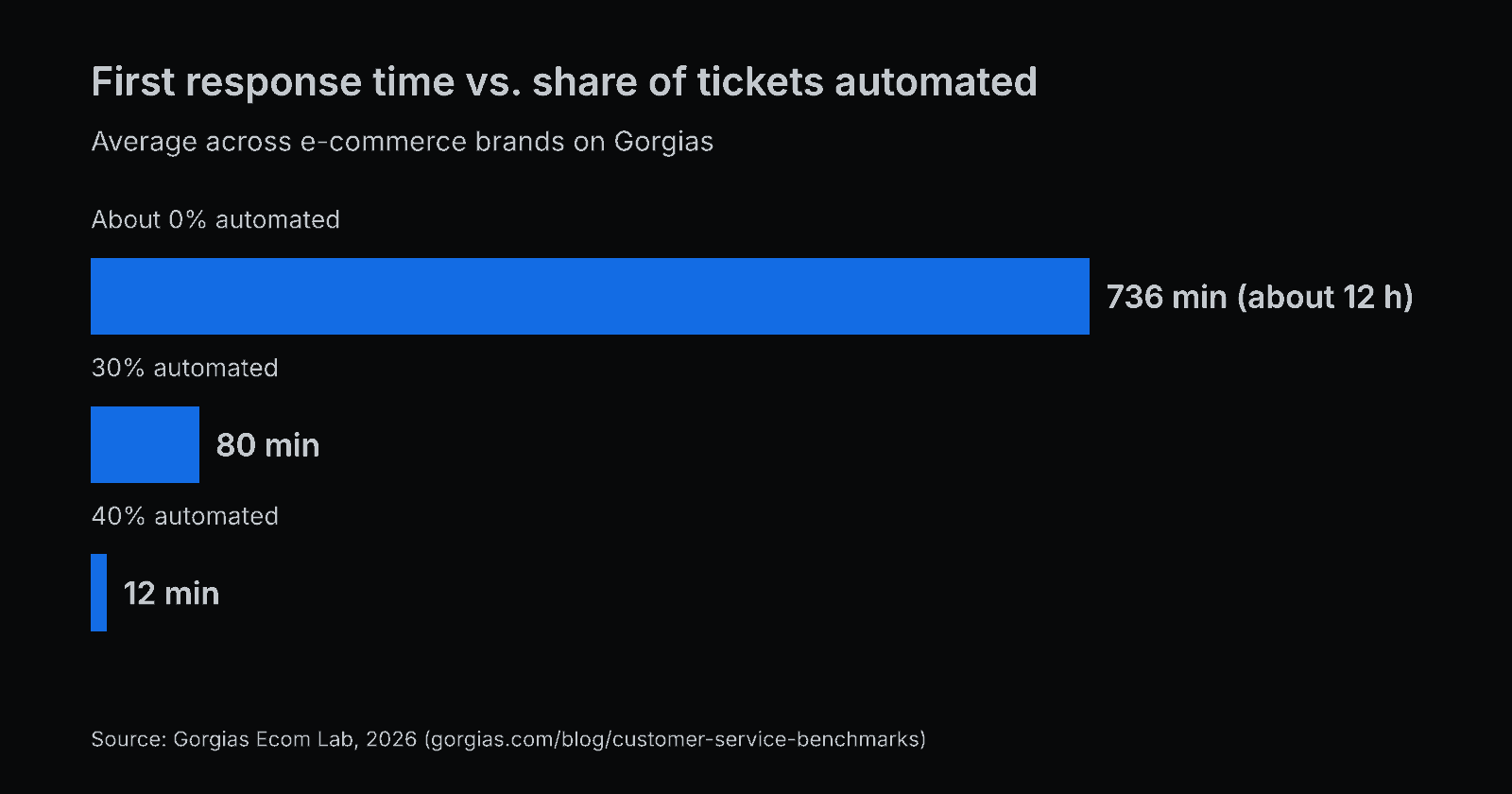
The chart is the clearest pattern we found: brands that let automation handle part of the volume answer the rest much faster, because the team's queue is shorter. These are averages across each brand's tickets, not chat-only figures, so don't hold them against your chat numbers.
Targets we'd set for a small online store
Benchmarks describe other companies. Targets describe your promise. For a store with one to ten people answering, these are the numbers we'd start with:
| Channel | Median target (office hours) | Slowest 10% should stay under |
|---|---|---|
| Live chat | 1 minute | 3 minutes |
| Email and contact form | 1 business hour | 4 business hours |
| Messages outside office hours | Automatic reply right away, a person at opening time | First hour after opening |
Why a median and a 90th percentile, and not one average: the average gets pulled up by a few very slow conversations, and the median ignores them completely. You need both views to see what most customers experience and how bad it gets for the unlucky ones.
How to calculate first response time correctly
The formula is simple: FRT = time of first team reply − time of first customer message. The decisions around it are where numbers go wrong.
- Start the clock at the customer's first message, not when they open the chat window. A visitor who opens the Messenger and leaves without typing has not asked anything.
- Don't count automatic replies. An auto-acknowledgement ("thanks, we got your message") sent in two seconds is not a response. If you count it, your FRT looks perfect and tells you nothing.
- Report AI answers separately. If an AI agent answers instantly, FRT for the whole store drops to seconds. That is real speed for the customer, but it hides how fast your people are. Track FRT for conversations a person handled on its own.
- Use business hours. Pause the clock when you're closed. A Friday 21:00 message answered Monday at 9:00 is a 60-hour wait in calendar time and roughly zero in business time. Show both if you want, but set targets on business hours.
- Split by channel. Chat and email have different expectations. One blended number is useless for both.
- Look at it by hour of the day. The weekly median can look fine while every day between 12:00 and 13:00 is a disaster.
Worked example: why the average misleads
Ten chats on a Tuesday, with first response times in seconds: 20, 25, 30, 30, 40, 45, 50, 60, 90 and 1,800 (one chat waited 30 minutes while the only person online was packing orders).
- Average: 2,190 ÷ 10 = 219 seconds, about 3 minutes 40 seconds.
- Median: the middle of 40 and 45 = 42.5 seconds.
- 90th percentile: 90 seconds (9 of the 10 chats got a reply within 90 seconds).
The average says your team is slow. The median says it's fast. The truth is that it is fast with one gap, and the fix for that gap (someone covering chat while orders get packed) is different from the fix for "slow".
Seven ways to lower first response time
- Publish office hours and the expected reply time. Customers who know they'll hear back "tomorrow from 9:00" don't send the same question three times. Our after-hours message templates cover what to write.
- Route automatically. Unassigned conversations wait the longest because everyone assumes someone else has it. Assign in turn or to whoever has the fewest open conversations, and cap open conversations per person.
- Prepare saved replies for the top five questions. Delivery time, returns, sizes, payment methods, order status. Our 8 "where is my order" replies are a good start.
- Escalate waits before they become long. A rule that raises priority or pings a teammate after the customer has waited 3 minutes catches the 1,800-second chat from the example above.
- Answer from your phone. In a small store, the person on chat is also packing parcels. A push notification on the phone can turn a 30-minute gap into a 2-minute one.
- Let an AI agent take the repeat questions. It answers "how long does delivery to Austria take?" from your own shipping page in seconds, and your team's queue gets shorter. Hand over to a person when it can't help. Our guide to setting up an AI chatbot from your own content covers the setup and the test before launch.
- Staff for your busiest hours. Check which hours have the most conversations and the most missed targets, then move lunch breaks or shift starts by an hour.
Example: a three-person fashion store
Take a made-up but typical case: a store selling women's clothing in Germany has three people, one of whom also packs orders. Chat is open Monday to Friday, 9:00–17:00.
Their numbers for September: median chat FRT 50 seconds, 90th percentile 11 minutes. The report by hour shows the slow chats are almost all between 11:00 and 13:00, when the packer is alone on chat while the other two are on calls with suppliers.
They make two changes: a rule that pings everyone on mobile when a chat waits 3 minutes, and saved replies for the four sizing questions that make up a third of all chats. In October the median is the same, and the 90th percentile drops to 2 minutes 30 seconds. The fix was not "answer faster", it was "stop the gap at lunchtime".
How to track this in Shopxare
- Reports → Conversations shows the median first response time, time to close and CSAT, each compared with the previous period, plus first responses per day, the busiest hours and missed reply targets. You can filter by channel, team or teammate. Conversations handled only by a flow are not counted. See Reports.
- Settings → Teams & assignment is where you set office hours and holidays, reply targets (SLA) for the first and the next reply, and automatic assignment ("Round robin" or "Balanced", with a maximum of open conversations per person). Missed targets are checked every minute and can notify you. See Teams and assignment.
- A workflow with the trigger "The customer is waiting for N minutes" can set priority, reassign the conversation or add an internal note. See Workflows.
- Saved replies open with "/" in the reply box.
- Are AI answers in the Messenger from your own help articles, pages and files and hands over to your team when it isn't confident, when the customer asks for a person, or when the topic is sensitive.
- Shopxare Mobile lets you answer from notifications on your phone.
When chasing a lower FRT is the wrong goal
- When it makes replies worse. A 20-second "Let me check" that's followed by a 15-minute wait is slower for the customer than a complete answer in 90 seconds. If your FRT dropped and CSAT dropped with it, you're gaming the metric.
- For complex email cases. A damaged-goods claim needs photos, an order lookup and sometimes a call to the carrier. One good reply in two business hours beats a quick acknowledgement and a second email later.
- When the real problem is volume. If the same three questions make up half of your chats, the fix is a clearer delivery page or an AI answer, not a faster team.
Try it on your store
Shopxare is free, with no credit card. Install the Messenger, set office hours and a first-reply target, and after a week Reports → Conversations shows your median and your missed targets.
FAQ
What is a good first response time?
For live chat, under one minute during office hours; LiveChat reports a 35-second average across industries and 55 seconds in retail. For email, within one business hour is a strong standard, and the same business day should be your upper limit.
How do you calculate first response time?
Subtract the time of the customer's first message from the time of the first reply by a person. Leave out automatic replies, pause the clock outside business hours, and report the median of all conversations rather than the average.
What is the difference between first response time and average response time?
First response time only measures the wait for the first reply. Average response time measures every reply in the conversation, including follow-ups. A team can have a fast first response and slow follow-ups.
Does a chatbot reply count as a first response?
Only if it answers the question. A bot that greets the customer or asks them to wait is an auto-reply and shouldn't stop the clock. Report AI answers and human answers separately so you can see both.
What is the difference between first response time and resolution time?
First response time stops at the first reply. Resolution time (or time to close) runs until the problem is solved and the conversation is closed. Track both: a fast first reply with a slow resolution still leaves the customer waiting.